Thursday, April 23, 2026

How Claude Spent Three Days* Debugging a ZX Spectrum Next Game (And Why It Was Worth It)

I'm building a game for ZX Spectrum Next. It's called Deep. The protagonist is a patient waking up in a psychiatric hospital with no memory of how he got there.

The Next port has been the hard part. I'd left it relatively late in the day to get the code functional on there. I'm using z88dk with sccz80, banked C across eight 16KB segments, a custom IM2 interrupt handler, and a hand-rolled display pipeline writing directly to ULA memory. It's not a simple project. When things go wrong, they go wrong in interesting ways.

And things went very wrong.

The symptoms

After getting the game to boot for the first time on ZEsarUX, I had a title screen. Progress. Then I'd press SPACE to explore and the game would fall into BASIC ROM. Every time. No crash message, no clue. Just BASIC.

The display was also misbehaving. Green vertical stripes. Keyboard input not registering. The MMU apparently drifting mid-run, remapping slots 6 and 7 to who-knows-where. Stack pointer landing in the middle of BSS. It looked like ten different bugs.

It was one bug. But I didn't know that yet.

Enter the agent

I'd been using Claude (Opus 4.6 and then 4.7) as a coding agent via Claude Code, with a local mempalace MCP server to persist session state between conversations. The idea being that significant findings get filed to mempalace immediately, so the next session can pick up the thread without starting from scratch.

Good thing too. Because the copilot client crashed on me several times over the following days, wiping live context. Each time, the agent had to reconstruct its mental model from whatever mempalace fragments had survived. A few entries were missing. It reconstructed anyway.

What the agent did, without being explicitly told to, was invent a debugging methodology suited to the platform's constraints. No printf on ZX Next. No gdb. No breakpoints in any conventional sense.

Instead: sentinel bytes. Volatile writes to fixed addresses in the $5B00-$5B08 range, read back via ZRCP (ZEsarUX's remote control protocol) after smartloading the NEX file. Nine staggered time snapshots per run: 20ms, 50ms, 100ms, 200ms, 300ms, 500ms, 1.2s, 2.2s, 4.2s. Combined with PC, SP, and MMU register dumps at each interval.

It was methodical in a way that was almost uncomfortable to watch. Hypothesis. Build. Flash. Query. Eliminate. File to mempalace. Repeat.

On and off, over three days - with and without my intervention.

What it found (the short version)

Nine bugs, in order of discovery. ROM calls in the render path re-enabling interrupts. Banked string functions returning stale pointers. BSS overflowing into the banked window. Missing IM2 infrastructure. Keyboard scan not working. Stack colliding with BSS. A sizeof() on a pointer field returning the wrong size.

And then bug nine. The root cause of everything.

z88dk's sdcc_ix variants of _memcpy_callee and _memset_callee pop their arguments in the opposite order from what sccz80 actually pushes at the call site. So memcpy(dst, src, 11) was running LDIR with bc=dst (roughly 32KB as a count) and de=11 as the destination. It was wiping huge swaths of RAM on every call. The MMU drifted because the trampoline's saved bank record got scribbled. The system fell into BASIC ROM because slots 6 and 7 got remapped to garbage.

cls() survived only by accident. Most of its garbage writes landed in ROM and were silently ignored.

The fix was two functions in a single .asm file with the correct pop order, linked first so the linker prefers them over the lib. Thirty lines of assembly to fix three days of chaos.

Why it took three days

The ABI mismatch doesn't announce itself. Every symptom pointed somewhere else. Stack issues, MMU drift, mysterious crashes, each one a plausible standalone bug. The agent chased all of them, fixed several real ones along the way, and kept narrowing. The sentinel methodology was what made it possible to bisect the crash to a single source statement even when the failure mode was "the machine falls into BASIC ROM 300ms after boot."

I'm not going to pretend it was cheap. Opus 4.7 at 7x the cost of Sonnet, for three days, hurts. But it found a bug that would have taken me weeks. Possibly longer. The kind of bug that makes you question your entire toolchain.

Where we are now

The game now renders with a viewport and sidebar. The main character is now walking about. IM2 is solid. The display pipeline is clean.

There are two known bugs left. The sidebar is rendering in the wrong position. One of the enemies doesn't move. Both are small, bounded, and can probably be handed to Sonnet 4.6 with a tight prompt.

The hard part is done. The game runs.


*on and off. In the background mostly.

Saturday, April 4, 2026

Well, I'm amazed


These agents are ridiculous. I've been more productive in my personal projects in the last week than I've been in the last 8 years.

In the last three weeks I've:

  • Written the +3 disk checker for the Plus3 I've been putting off for 3 years

  • Started the ZX Spectrum Nextgame I've been planning since I got my Next

  • Converted a 25k line Pascal/Delphi mod tracker to Rust and got it building on Windows, Mac, Linux, and the web (for the music to my game, of course)

  • Tidied up the parsing on my BDD framework

  • Fixed a couple of bugs in dokker and GoCrest


It's insane.

There are two issues with this though:


    1. I've learned almost nothing about how to actually solve the problems these projects present
    2. I don't fully trust some of it.

And that second one is the bigger problem.

Because everything works. Impressively well. Suspiciously well. The kind of “this shouldn’t be this easy” well.

I can build things faster than ever, but I’m also one layer removed from understanding them. When something breaks, I’m not debugging my thinking -  I’m debugging something I half-generated and half-understand.

It’s like going from writing code to reviewing code… except the author is an overconfident ghost.

I’m not convinced this is bad. In fact, it might be the whole point. Maybe the skill shifts from “how do I build this?” to “how do I steer this?” and “how do I know when it’s wrong?” My tests and specifications aren't always air tight, and agents fill the gaps if they think they can get away with it.

But it does feel like cheating.

And also like the future.

I've been used to being slightly removed from coding as a Tech lead, and it definitely feels good being productive again. I can go into a meeting having set an agent a task, and be reasonably confident the task will be done, documented and tested. 


The solution to the overconfidence? The same as it always was. Good  engineering habits, small, vertical slices, well thought out testing strategies, and good communication. Coding was never the hard part of development, we still have that (for now). 


We are the monks of old, sitting in our isolation, copying text by eye and by hand. In the same way the printing presses destroyed the monk's art, the era of hand crafting software is over too, for better or worse.


But.. just but.. maybe there's room for the storyteller, the one who can weave these tools the best will surge ahead and create new, bold creations with them.


Now.. why does the Sorcerer's Apprentice come to mind?


Tuesday, March 24, 2026

Disk Check for the ZX Spectrum +3

Well, not to jump on the agentic coding bandwagon or anything, I've totally jumped on the agentic coding bandwagon and implemented a Disk Check program in z88dk. Its taken me and copilot a couple of weeks, but I now have a functioning Disk Checker.


Copilot (and sometimes Claude, thanks Claude) helped me write almost all of this. I knew very little machine code, but I did know C. Copilot fixed the main bug I had when I was just running the disk routines, namely the crash I couldn't get my head around when trying to communicate to the controller. It was the biggest stumbling block to me getting it done, and it fixed it in about an afternoon of it fiddling with the ASM.

Hopefully now I can fix those two real +3 drives sitting on my shelf.. erm.

Features
  • Motor + drive status – Combined motor control and ST3 status check
  • Drive probe (Read ID) – Probe media and report controller status bytes; decodes ST1/ST2 on failure
  • Recal + seek track 2 – Track-0 recalibrate then seek verification
  • Interactive step seek – Manually step the head track by track
  • Read ID – Read sector ID from track 0 (requires readable disk)
  • Read track data loop – Continuously reads sector data on selected track (J/K to change track)
  • Disk RPM checker – Rotational-speed estimate from repeated ID reads; requires readable sector IDs
  • Run all – Execute all core tests in sequence and display a report card
  • Show report card – Display last run results (PASS / FAIL / NOT RUN per test)
  • Clear stored results – Reset all stored test results
  • Direct-key menu UI – Navigation and hotkeys respond directly; confirmation prompts use ENTER
Main menu

This was an exercise in how these agents work, their limits, my limits, the highlighs and the pitfalls. I let them pretty much have free reign, and had a lot of refactoring to do myself. It taught me a lot about how to work with them, and what I want from them and what I don't. 

But above all, it was really fun bringing the old and new worlds together like this!

Monday, April 19, 2021

A new addition to the collection - The Oric Atmos

I never had an Oric growing up. In fact I'd never heard of them - my world was a sheltered bubble of ZX Spectrums, Commodore C64s and Amigas, and the odd Atari console I vaguely remember playing on round a friends house and scoffing at the "backwards" graphics (whilst secretly really wanting to play Ghostbusters one more time).


However, a lucky eBay auction later where I am the only bidder landed me with this little beauty. 


Meet the Oric Atmos - a relatively rare 48k alternative to the zx spectrum from 1986 that just missed out on being popular. This computer sold well in France, and used a 6502 processor like the c64. This one is mint condition, boxed, and came with several useful books and (not so useful cause they don't work) cassette tapes - purchased on eBay of all places. Who'd have thought?

Fun fact: one can be seen in the background of the IT crowd on one of the shelves. No, not this one.


Machine specs:

Model: Oric Atmos

Memory: 48K (well, 64k actually but that's taken up by BASIC and needs hacking to get at)

CPU: 6502 @ 1Mhz

Sound: AY-3-8912

Cost: £150 from ebay


So, now all I need is a joystick expansion and something to load games into it that doesn't take 500 years to load and crash out half way through..

Wednesday, April 7, 2021

Building a c64 PSU part II


So as we left it, we should have something like you see in fig. 1, the mains side of the PSU is wired up with the fuse and the optional lamp.

On to the tricky bit!

I was lucky, and had an existing DIN connector from an old non-functional c64 power supply that came with the c64 I bought from eBay, but you may not be.

You can find the DIN connector here, and any 5mm diameter cable that has 4 "cores" that have about 1.5mm diameter wires inside it should be sufficient, such as this one which I will be using for reference.

Step 1: Assign your coloured wires to what they are going to do. So, in our example cable we have blue, brown, black and yellow/green striped cables:


  • Black wire will be +5v
  • Green/Striped will be -5v
  • Blue 9v AC
  • Brown 9v AC (doesn't matter which way around these go)

Step 2: Push the wire through the hole. Solder all the wires in to their respective terminals (with heat shrink!); the +/-5V are the most important to get the correct way around. They are labelled, if you're using the PSU I specified in part 1, as +Vo and -Vo. If you are using an LED, put two lots of heat shrink (one small, one big) on the -ve 5v wire, this will be used to cover the resistor legs.


Step 3: (Optional) The LED needs some juice, in our example around 2v and around 10mA forward current from the 5v supply for red LEDs. Solder one of the legs (you may want to trim them first) of the 300 Ohm resistor to the negative terminal of the 5v PSU. Put enough heat shrink on so that it will cover the bare leads of the resistor, and then solder some wire between the negative leg (usually the shortest leg) of the LED to the end of the resistor.

Step 4: Solder some wire between the +ve terminal of the LED and the +5v connection on the PSU. The positive leg of the LED is usually the longest. Pop the LED into its hole.

Step 5: Fit the DIN cover over the wire before you connect to the pins.

This is the main tricky part, soldering the other end of the cable to the right DIN connectors. It helps here if you have some helping hands but they are not essential. Here's another blog explaining how to do this in more detail, it's fiddly! Solder, in any order;

Pins with colour coding

Pin 5 to the black cable (+5v)

Pin 2 to the green/yellow striped cable (-5v)

Pin 7 to the blue cable (9v AC)

Pin 6 to the brown cable (9v AC)


source: www.retroleum.co.uk


Testing is tricky, the DIN connector is not really great for sticking probes in to so be very careful - its best to check without the hood of the din connector on. However, even if you have stuck the hood on, you should be able to check with your multimeter that you have 5v on pin 5, 2 and 9v AC (remember to put your multimeter in AC mode!) It's essential to check you have the right values at the right pins, cause any mistakes and your C64 could be damaged.

Step 5 is to fix the DIN plug's hood snugly over the pins, and affix in whatever way your particular DIN connector affixes. Then heat shrink all your heat shrinks if you're happy!


And thats it! I hope you now have a decent PSU for your Commodore 64.


Friday, April 2, 2021

Restored £60 ZX Spectrum

Bought on eBay 2019, and restored early last year (2020) sometime, this little zx spectrum's life had been a hard one.

It became even harder when I applied my inexperienced cag-handedness to the situation. Believe me, don't practice soldering on something this age.. it's just too delicate!

It was the first one I'd ever done, and was a huge learning curve. Since it was so long ago, and I have pretty much forgotten everything I had to do to figure out what was wrong with it, I'm recording the bill of work done to it here for posterity.


Model: ZX Spectrum 48k

Board: issue 3B


  • Replaced the ULA with retroleum Nebula
  • All lower memory socketed 
  • Broken traces fixed damaged when I removed the lower ram
  • Two PCB through holes fixed damaged whilst removing the lower ram
  • Recapped
  • Traco 5v switching regulator (can't remember the amps)
  • Composite mod added
  • Replacement face plate
  • Retouched logo

These  ZX Spectrum boards really are a piece of artwork to my mind, and the black caps and black nebula board only add to the beauty.

I hope you agree!


Thursday, April 1, 2021

Building a c64 PSU

PSU in action - you too can build this!

After watching the amazing Jan Beta build a c64 PSU from bits, effectively cobbling a 5v PSU and a 9v transformer together, I thought I'd give it a go myself.

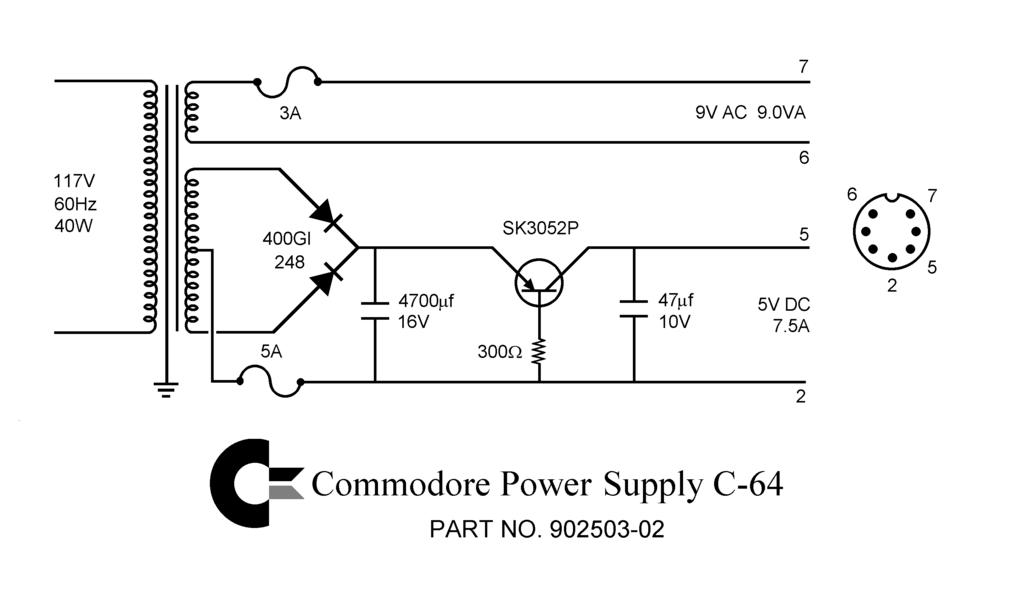
The c64 is that iconic 8bit computer we all loved back in the eighties. It has a very odd PSU which delivers both 9v AC and 5v DC to the main board, and pretty much nothing I've seen in the modern world (that isn't specially made) can deliver this Frankenstein requirement.

Enter Jan's lazy method!

WARNING: I do not take responsibility for you electrocuting yourself when you are doing this. Only proceed to do this if you are comfortable and competent at working with mains voltages!!

We won't be measuring the mains voltages so nothing fancy is required, but you need to know the basics of how to use a multimeter properly. And how not to die electrocuting yourself. 

My own Lazy Method:

You will need:

  • XP Power, 10W AC-DC Converter, 5V dc, Encapsulated (RS Component Stock no.:172-0797)
  • PCB mount transformer 9v 25VA 1x9 o/p (RS Components Stock no.:732-0471)
  • Red neon Indicator, Lead Wires Termination, 240 V, 6.4mm Mounting Hole Size (RS Components Stock no.:576-608) (optional)
  • Terminal connector block (only need 2 pair, 16 is surplus!) 
  • A suitable project box - I chose this one
  • Some spare mains cabling
  • A mains cable with a plug attached
  • A couple of cable grommits the same size as the cables to stop the cables from slipping and that covers the holes where they come through.
  • Epoxy resin (to glue down the components) or hot glue
  • A multimeter
  • Some heat shrink tubing
  • A fuse holder for a standard 1 amp fuse (or lower rating, 0.5 amp would be ok)
  • At least a 1 amp fuse
  • A red LED (optional)
  • A 300 ohm resister (to dissipate the power from the 5v supply to the LED if you are using one)
  • An 7 pin DIN adapter and suitable cable - I had an old one from the c64 I bought where the PSU was broken
  • Soldering skills (solder, a soldering iron, tough skin for burns)
  • A drill and a variety of bits (to put holes in the case)
  • RCD socket like this one
  • A good multimeter
We are using the terminal block to separate the mains side from the transformer and converter, because if one of the them blows we can just remove them and replace them with another, without having to desolder the parts in the future. See? Forward thinking. I didn't know I had it in me :)

Step one is to drill your holes in the case. You can work out the placements for the holes yourself, your mileage may vary. There should be: 
  • Two holes in the "front" of the project box, one for the cable that goes to the computer and one for the LED
  • Three holes in the rear, one for the cable, one for the fuse holder and one for the neon lamp
I'm not going to give measurements, but sufficed to say the bits you use to drill the holes should match the size of the component that will go in the hole!

I do suggest, however, you put the holes in the base of the project box only. This is so when you open the box for maintenance (or other general faffery), you don't have the hinderance of wires being connected to the top of the box.

Step two is to run the mains cable into the box and secure it by tying a knot. Don't forget to put the grommet on, ready to be pushed into the cable hole. Connect the blue (neutral) lead to the connector block. 

Step three, fit the fuse holder in its hole, and connect the live cable to the top connection on the fuse holder by soldering with lots of good solder and plenty of flux. Don't forget to twist the cable and tin it before you connect it to the fuse connection, and add a heat shrink tubing to the wire on the fuse end. Don't shrink the tubing unless you are sure of the position the cable is in, its much harder to change things if you do.

Step four, use a longish piece of brown (UK live) mains cable to connect the other fuse connector (the one you didn't connect the mains cable to) to the connector block. You will have to solder on the cable to the fuse connector in a similar manner to step three. Don't forget some heat shrink tubing, although this one isn't such an issue because you can unscrew the terminal to add it if you forget.

Step five, screw in the neon lamp to the terminal connector on the mains side. Push the led through the hole you made and screw it in place if you so desire.

Fig. 1 - Partially complete!
Step six, connect some well lengthed mains cables (live and neutral) from the other side of the terminal connector block to their respective connectors on the  9v ac transformer. This should be the same colours going in to the terminal block as going out! (In the UK brown for live, blue for neutral). You should  solder on the wires to the 9v AC transformer using plenty of solder and a tinned wire, respecting the correct connection for neutral (usually marked with a "0") and live (unmarked? check this). Remember again to add the heat shrink!

Step seven, connect some well lengthed mains cables (live and neutral) to their respective terminals on the 5v AC/DC converter with tinned wire and plenty of solder again. Yep, don't forget the heat shrink!

Fig. 2 - Testing 
Phew! That's the first part done, the part with the mains AC is the most important to get right. If ok, you should end up with something like in figure 1 and 2. Congrats, we're half way there!

Now it's important to check everything at this stage, and an RCD is a good idea. This will stop things exploding and taking out your mains circuit breaker and possibly damaging the components or electrocuting yourself!

Put the multimeter in AC voltage measuring mode, and measure across the output of the 9v AC transformer. You should see a nice steady 9V.


Again, in DC voltage mode, measure across the output terminals of the 5v converter. You should see a nice 5 volts. 

So, on to the complicated part in part II! Stay tuned.